
With the basics of node and site settings translation behind us, we are getting to the more complex parts, at least in terms of the user interfaces involved. While with node translation you get a tab on each node to translate it (regardless of setting up translation sets or using translatable fields), and with settings translation, you get quick jump links, the subsystems that work with textgroups will require a better understanding of how the Drupal systems relate.
Three ways to think about language support
When people want to have language support for their site, they typically think of one of three things:
- Being able to mark an object as in one language. With node translation this was achieved by language enabling nodes.
- Being able to mark an object as in one language and relate it to others as being a translation set. For nodes, this is supported by Drupal core's content translation module.
- Finally, being able to translate pieces of the object that need translation and leave the rest alone. Load the right language variant of the object dynamically as needed. In the case of nodes, this is achieved with the contributed entity_translation module (formerly translation.module).
The first case is great when you don't need to translate the object, the second is great when you need to use translations in different contexts (for nodes, you can maintain a separate comment set, put in different menus, etc). The last is great when you want to maintain the object the same way regardless of language. This might be great for an e-commerce site. Read part 4 of my blog post series for exact details for nodes.
Applying this to blocks, the i18n module provides functionality (1) and (3), but not (2) at this point. Translation set support is being implemented for various objects (menus, paths, etc. are already covered by i18n), but not blocks yet. (1) is very simple to use, but (3) will be a real pain if you don't read this blog post...
Marking blocks with languages
Enable the Block languages module from the the Internationalization module suite. As the name suggests, this module only lets you specify languages for blocks in itself. It requires string translation module which we'll talk about later below. For now, we'll just concentrate on the language relation functionality.
Now when you go to Administration » Structure » Blocks » Add block (or edit an existing block), you'll see a new Languages vertical tab. That is where you can pick a number of languages to restrict the display of this block to. This is much like the other block visibility components, and yes, it should have been part of Drupal core. Those checkboxes will only manage hiding and showing the block on pages depending on language. You can use this to have different copies of blocks for different languages and treat them differently (eg. place them at different weights on pages if needed). You can also use this to have single language blocks only showing on certain language versions of the site. Such as when you have a discount only for certain audiences.
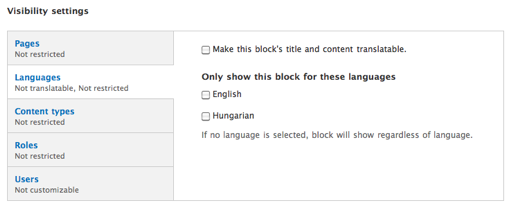
That said, you can kind of achieve (2) from above by using different copies of blocks for different languages, but relations between the blocks are not maintained. I think this would be a great feature for future versions of i18n.
You might have also noticed the "Make this block's title and content translatable." checkbox, which sounds like a very simple flip-switch to implement (3) for blocks, but to make that work, I need you to do some learning first about the underlying pieces.
Ok, what are these textgroups?
With node translation and path alias translation support included only in Drupal 6, there was a pressing need for providing some kind of API for contributed modules to translate other things. It was clear that those other things will mostly have tiny data structures. Think blocks have titles and body text, menu items have titles and descriptions. These cannot have additional fields, so the structure of the data to translate is well known. Many of these things did not become entities in Drupal 7 either, given they are structural or supplemental data, and not content per say.
So support for translating these values was needed. But Drupal core already had a translation system which let people store keys and translations for them. It just happens that Drupal core uses English text as keys for the UI translations. Location information was also possible to store with these, so we could reuse the interface translation system (and the user interface) to translate details of other objects. What's even better, you get import and export functionality for these translations for free.
Textgroups show up as a segmentation of translatable strings on the user interface translation screens. When you go to admin/config/regional/translate/translate (Administration » Configuration » Translate interface » Translate) even on a bare bones Drupal 7 core based site with locale module enabled, you'll see the usually little noticed "Limit search to" "All text groups" or "Built-in interface" dropdown. When more textgroups became available, such as with block translation, you'll find those here too.
This sounds like a brilliant idea in terms of reuse and the kind of functionality you get for free, but its a very confusing UI for anybody who does not want to understand all the underlying mechanics - that is most users. Translation of systems using textgroups happens at a totally different place to where you actually enter the data and it is fragmented to per-string items - you translate your block title and then look for your block body separately. It is also intermixed with permission issues discussed below. Don't get me wrong, I'm not dissing the work of anybody else, I was one of the proponents of this solution. Huh. Thankfully now we have experience with it and know better for the future. Some contributed modules emerged to build more intuitive UIs, catering for specific use cases, and as Jose Reyero usually says, the i18n module is merely a backend module for your needs, not a multilingual solution. People could possibly need different UIs based on their needs. So for now, I'll show the base i18n functionality here, which should help you understand the concept fully.
The string translation module and setting up permissions
The string translation module that was turned on with block languages is key to providing the backend for the textgroups functionality. While Drupal core itself supports textgroups in the database and editing UI, a data submission API was not provided, so this module fills in the gap. Now that you have both block languages module and string translation enabled, you should see a "Block" textgroup on Administration » Configuration » Translate interface » Translate, but it will be empty for now.
Translators need to be able to translate all kinds of text on your site. These strings however can use a wide range of input formats and especially if your site uses fragile input formats such as PHP input, you don't want your translators to fiddle with those strings. So you'll need to set up permissions for translators to certain input formats to let them translate those. The Administration » Configuration » Regional and language » Multilingual settings page has a Strings tab to configure that. By default, only plain text strings are enabled, so your regural blocks (submitted with Filtered HTML by default) would not be properly translatable. Let's grant the Filtered HTML format for translators!
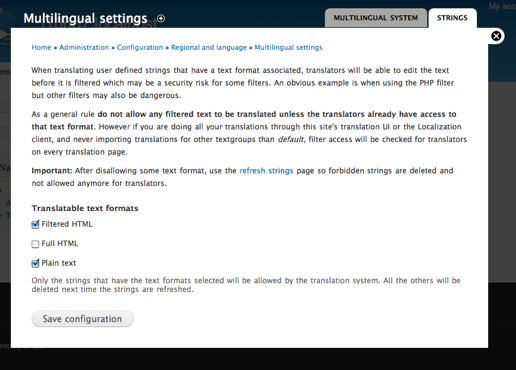
Unfortunately this is needed because the textgroup system does not keep track of input formats, so only text in allowed input formats are saved and made available for translation. The system cannot use the format allowed for the account when the source text is saved, since that might be above the permissions allowed for translators. (A more complex but maybe more standard implementation would be to require a translator role, and apply the input format permissons from that role. I think this is complex enough to not to try to put in even more code reuse...).
Now you can translate your blocks
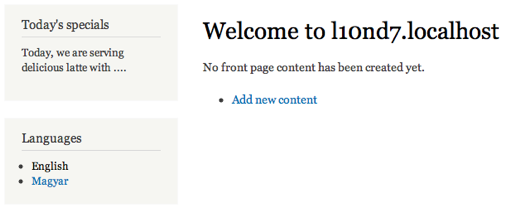
Now that we set up the string translation permissions proper, we can go back and add a block with translation support. Now let's check "Make this block's title and content translatable.". You can combine this with language visibility (ie. translate and only show for some languages), but I'll keep it to show for all languages here. I've created a block titled "Today's specials" and with the text "Today, we are serving delicious latte with ....". When saving the block, I'll be told that both strings are saved for translation with the location keys "blocks:block:1:title" and "blocks:block:1:body". This is how textgroup locations keep track of where strings came from. If you did not do the previous step, you are told that the body is not saved due to a disallowed input format. Look out for this feedback to make sure you do save the block right.
Now because you've read all the above, it will almost feel natural to you to go to Administration » Configuration » Translate interface » Translate, pick the Block textgroup from the dropdown and see the two translatable strings there. One you save your translations and go back to your site you'll quickly see the results.
My English block looks like this:
When switching to Hungarian:
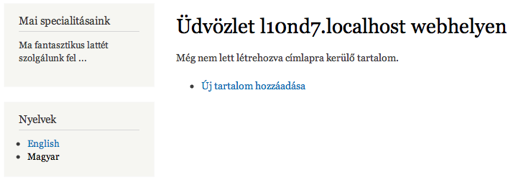
We have covered this in previous pieces, but for this to work consistently, you'll need a language selection mode that you can trigger from the browser. I've set up URL based language negotiations with 'en' and 'hu' as path prefixes for English and Hungarian on this demo site. I've also enabled and placed my custom block and the language switcher block to show how this works. Now when I switch to English or Hungarian, the right translation of the block will show. Because translations use the same block object, the placement is consistent in all languages and I don't need to juggle multiple copies of the block. If I'll ever need blocks just for one specific language, I'll still be able to add a new block without translation, and limit it to one language with the method explained above.
Internationalization sprint coming up!
To spread multilingual functionality and improve on usability and fix bugs 5 days of internationalization sprinting is planned for mid-May 2011. If you are interested in joining don't hesitate to sign up!
Menus planned for next
Block translation provides a great segway to menu translation (which in some ways depends on block translation for certain tricks). I plan to cover that in the next part.
In the meantime, you can still check out part 5, read part 4, part 3 and grab part 2 and part 1 of my series.
Thanks for reading!


Comments 19
possible UI improvement
I've detailed a possible UI improvement proposal at http://drupal.org/node/1114602
I read all the six parts so
I read all the six parts so far :) extremely useful and very well written.
Thanks
Translating using Views or Pages?
Hi Gábor,
Very nice articles. I'm trying to setup a multi-language website in 3 or 4 languages (multiple translators) but it seems I have to create one view for each language which becomes cumbersome and insane as the amount of content types increases as well as if you decide to do some changes as well as from CSS layout.
Basically, articles need to have small words that change depending of the language. What would be the most efficient way to implement this? Basically, it's just simple stuff like "by" to por (portuguese) as well as words like comments, etc. I have been googling but since i'm no drupal expert i think I may have to do just multiple views for now...
"by" and "comments"
From where do the words "by" and "comments" come from your views? I don't understand.
Hi Gabor,
Hi Gabor,
thanks for getting back to me. I have setup a new content type with subject, body, etc. I get this data using views since this content type is supposed to be like a blog/article post. So I extract comment numbers, author, etc but I need to translate part of it since different languages use different words for comment, "by author", etc. So far I'm doing this as different Views pages but then in Panels I need to setup conditionally which View page to use depending on language of the site. This is not terrible but it implies maintaining 4 versions of Views as opposed to one with translatable "fields/variables", which is the most elegant solution. Any ideas?
Cheers!
bruno
i18n_views
There is a separate module called i18n_views that should help you with this, neither i18n, nor views has direct support built in, so i18n_views bridges the gap.
Thanks Gabor. I've come
Thanks Gabor. I've come across that module but alas, there is still no Drupal 7 version available yet... :(
Thanks Gabor. I've come
Thanks Gabor. I've come across that module but alas, there is still no Drupal 7 version available yet... :(
Sorry, to directly reply to
Sorry, to directly reply to your question, they come from "rewriting output" in Views since I'm not relying on the default Content output. Would this be a better approach? I don't want to have all the info it outputs.
Thank you for these blog
Thank you for these blog posts. Covers all changes from D6 in a very descriptive and thorough way. I attended your sessions @ drupalcamp sthlm this weekend and was impressed with your work. Keep it up!
Menus planned for next
A walkthrough of the options available for translating menus can't come soon enough.
Thanks for these great articles. They're so helpful!
Menus next
I second this! I have read all articles in this series and it has helped me every step on the way to make a multilingual site. Now only the menu remains. Really looking forward to that article!
Thanks for the great work done!
Translate block title
Gabor,
First of all congratulations for your tutorials: clear, efficient and easy to follow.
I still have the following issue : "strings are saved for translation with the location keys "blocks:block:1:title" and "blocks:block:1:body". Going to Administration » Configuration » Translate interface » Translate, pick the Block textgroup from the dropdown and see the two translatable strings there". Translation for the title is displayed, inputing the translation is OK, but still having the block title as Translation + context. Not able to figure out how to get rid off context in both title and body. Thanks in advance for your support. P.S.: I'm running on the latest Drupal releases.
latest i18n
It is best to run the latest Drupal 7 i18n version as well (Jose publishes releases regularly). That has a much better user experience for translating configuration objects. See http://hojtsy.hu/blog/2011-jun-17/drupal-7s-new-multilingual-systems-pa…
Thanks for the article! Very
Thanks for the article! Very informative!
I have one question when it comes to being able to translate custom block data. If I create blocks through a custom module, I want the translation process to behave much like nodes do (creating different versions). I have image upload fields in hook_block_configure() that I want to be able to be swapped out for different languages (to give culturally-relavent images). I'm beginning to think there's not really an infrastructure for this... am I missing anything? Would the best solution just to create redundant blocks for each language? Thanks!
node translation
Its not very nice, but you can just use node translation (or the entity_translation module), and use a view to expose your block. The view can then pick the version of the node in the right language, and the node can have any fields, etc. Among the ideas/plans for Drupal 8 is to make custom blocks entities so they are fieldable like nodes.
Learn Introduction to PHP
It is really nice article about which requirements should be important to language support. Do you know any resources to learn Drupal7 API?
localization API cheat sheet
Check out the localization API cheat sheet in my footer at http://hojtsy.hu/files/Drupal7TranslationCheatSheetv2.pdf More details at https://drupal.org/developing/api/localization
How can i get permissions to other users?
Hello People... I've five users, with role "editor", but they can't translate blocks. Do you know what's the way?
Thanks!