Acquia

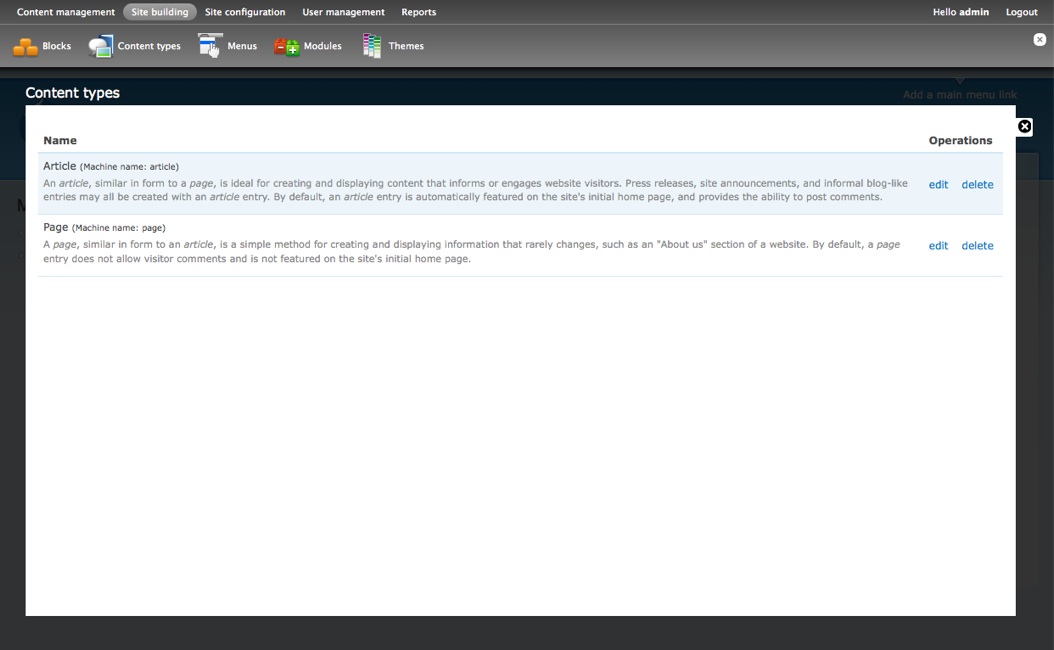
At Acquia, among other Drupal 7 UX improvements, we've been working making the overlays work as designed by Mark Boulton and Leisa Reichelt. The plan includes a header with two levels of fixed items, which all invoke overlays (almost full window popups), showing above the current page. Instead of reinventing the wheel, we started working towards porting the existing Popups module to Drupal 7 and implementing the Drupal 7 overlay looks via a skin, so we can leverage the existing work, testing and wisdom from the module.

Due to how hard JS is to debug still with Firebug, we faced some issues, but given that we are over those, we have the basic overlay looks ready and facing some other engineering problems which are pretty much standard with how the Popups module works. For integration purposes (and because our proof of concept version of the header did not look as good), we worked with Young Hahn's header patch. You can find my modifications to that to work with overlays on the issue. While Young's patch does not yet map to the D7UX plan to have a fixed set of top level items and a fixed set of lower level items, redefining the D7 admin information architecture, for working out the overlay, it is pretty good as it is now.

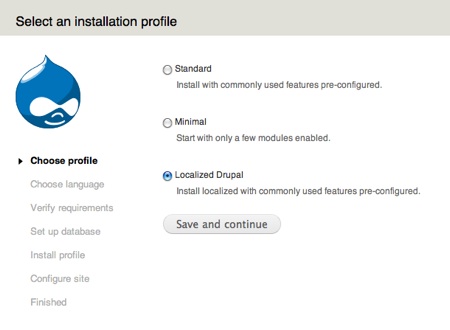
Since we were working on (a) porting Popups module to Drupal 7, (b) create a d7ux skin for it, (c) a header which we did not use in this experiment, and Young Hahn was working on a header which needs a patch and images added, I've decided to pull together a quick Drupal package for your testing pleasure. The distribution includes a D7UX install profile which should be used so that the proper modules are set up. It also includes the latest header patch from Young's issue (which has my popups class modifications) and the images and sprite from there. The ported Popups module and the D7UX skin for it is also included.

While I am searching for the best ways to collaborate on the overlay (and possibly also on the header), so we don't need to work back and forth in issue queues, possibly stepping on each other's toes, I am also sharing the D7UX Popups module theme as a separate package, so those fond of applying patches and adding up images from different sources can keep up with development.

There are some pretty significant known issues with the overlay/popups. The biggest one being that since the overlay page is loaded into the same DOM tree (same HTML document) as the rest of the page, ID collissions can easily apply. If you load up a node edit form on a page with a node edit form, #node-edit will appear twice. Behaviours rightly assume that an HTML ID will ever appear once, so they do not expect this situation. This breaks some behaviors. Also, since Popups modules opens new popups on clicking on new links without closing the previous ones, this can also happen if you open two node forms in the popup in a page view. There are also smaller styling problems (eg. overlays on lower layers move up a few pixels when new popups are opened), but we should focus on the significant issues first.

I am looking at breaking down the Popups module (again) to core patches so its parts can be included in core. That would assume that the basic working of it (loading up new HTML-particles into the same HTML document) can be made work without major issues. The great maintainer of Popups module, Tao Starbow worked on quite a few core patches, but unfortunately those got the fate of the overdebated. The issues were split up, then some of the individual pieces were discussed to be over-generalized and in other areas, the scope of Popups in core was narrowed considerably to some confirm forms. No doubt Tao got burnt out from there.

That was way before Mark and Leisa suggested using the overlay technique for the Drupal 7 administration UI. I hope we can revive and refocus some of the issues and get this effort going faster, so we can focus on usability of the actual admin screens showing up in the overlays. Rendering API, JS and CSS wizards welcome! Look for my upcoming blog post on a plan to get this into core!

Download the full Drupal package to test or download the d7ux-popups-skin only, if you are keen on applying all the patches yourself. Place the skin into the skins directory of Popups module.

My previous blog post entitled On a mission to improve page regions in Drupal 7 outlined how special casing things like custom help settings, the mission statement and footer message make understanding and using Drupal harder and general assumptions not being applicable to set text formats or visibility on such items. Having the somewhat special content region was also another example. After more work in this area, I'd figure I post a status update for those who'd like to have a bigger picture overview:

  • System help text is now a block in Drupal 7. You can offer your users to customize it (turn it on/off themselves) or hide excessive help text on certain pages. Since the help block is placed in a help region, you can add custom help to any pages with custom visibility settings tailored to your needs. You can use full text format support for these blocks. No more special user registration guidelines or contact page help settings. It is all general now and way more powerful. I was alerted that content type help is another special case which is not yet migrated. The issue used to track that remaining task is at http://drupal.org/node/448784 (but does not have a patch yet, contributions welcome!)
  • I've suggested migrating the site mission statement to a block. Since that was overloaded both as a (badly implemented) markup aware site mission and an RSS site description, the patch migrates the mission statement to a block and adds a standalone setting for the RSS site description. Similar migration path to the help blocks. Patch to review and test at http://drupal.org/node/428800
  • New since my last blog post: site settings in Drupal 6 and before also includes the footer message. This is even easier to eliminate then the site mission, since it is not overloaded for any other reasons. It should be migrated to a footer message block (which the user can then retitle based on their previous use of the block to "Copyright", "Affiliate links" or whatever). Patch for review and testing at http://drupal.org/node/453080
  • Finally, I've been working more on the "main content region as a block" functionality, which lets you reposition your main content and put blocks above and below it without having special _top and _bottom block regions to get your desired result. This patch makes all Drupal 7 themes required to have a "content" region to ensure that users cannot easily break their sites. You'll not be able to enable themes which don't implement this region. Also, the main page content block is required to show up in some region for the same reason. Feedback is more then welcome at http://drupal.org/node/428744

I hope we can get through these soon, since I have even more ideas on eliminating funky special cases in site building and theming making site setup and theme authoring even easier.

Last spring, I've read a Drupal theming book and was amazed by how things like the search and menu features for themes need special settings and theming while their parallel implementation exist as blocks. I was also deep in improving input formats (which was since then taken on by others) and did a comparison of what is not input format enabled in Drupal. That uncovered even more parallel implementations of things which should basically be blocks.

At Acquia, we are (among other cool things) hard at work to improve the user experience for Drupal 7 and as part of that effort, I am focusing on regions and blocks so that page building can be more unified then ever. You should know where to look to position your content, disable items on the page, set up custom text for pages, etc.

Help settings

I started off with the help settings. Drupal themes have a $help variable and that help text is usually generated by one or more modules. There are two independent user provided settings for help however. One can put admin provided help on top of the user registration and the contact pages. These are implemented as custom settings which add this help to the page in custom ways.

I realized that by making the $help item a region, we can gain certain cool features:

  1. You could add custom help to any page you want. Cut out the two one-off settings and let the admin put custom help on any page they want.
  2. Use your favorite input format to enter the text with your favorite WYSIWYG editor for it (or without that obviously).
  3. The admin could completely disable display of help. Display of help could even be disabled for higher roles (site editors), for whom help might be in the way. Different custom help could be provided for different roles.
  4. Admins could provide users with user customization possibility for the help display. This is already supported by Drupal for any block.
  5. Custom set help text could be displayed on more then one page (eg. in a site area).

All this without coding, loosing two custom settings and making the help area a region. Pretty cool, heh? Check out the patch which needs a reroll here: http://drupal.org/node/240873

Content region

In Drupal, the main page content is output by appending the blocks put into the content region in this order. There is no way to put stuff above the main page content by default. Many themes worked around this in Drupal 5 and 6 by adding a content_top and a content_bottom region instead, so you can put stuff above and below the main page content. I believe "top" and "bottom" or "above" and "below" are keywords we handle inside the regions system. We move stuff around inside one region to order them. So I suggested we should have one region for content and make the "main page content" a regular looking block instead.

There are obviously some improvements needed to ensure that all themes can accommodate this block and that people cannot easily turn it off. These are being discussed. Patch needing review at http://drupal.org/node/428744

Site mission

This case provided the title hint for the blog post. Mission statement is a setting in Drupal at least in the past half decade. It is configurable on a plain textarea on the site settings page (no input format selection) and is hardwired in themes to show on the front page of the site. Or not at all if the theme customization options have it unchecked.

If we go a bit farther, we see we have a way to put text into a region of the website on one specific page here. Wow, sounds like a highly simplified version of what blocks can do ripped of all the flexibility (even input format selection).

Having mission as a region would allow us cool things like:

  1. We can have a mission statement displayed on more then the front page (e.g also on the company team page).
  2. We can have the mission statement only displayed somewhere else, but not on the front page (eg. only on the company team page).
  3. We can set whatever input format we want so we can even display complex maps for example.
  4. We can put more then one block into that region, so dynamic data can be output there via module defined blocks.

This all sounds too good so obviously there are some small drawbacks as well. Discuss in the issue queue: http://drupal.org/node/428800

Even more blocks, even more regions?

If you look at the site and theme settings, a few remaining items pop into your face, which will need attention once we have the above covered:

  1. The footer message. This should just be one block among the others in the footer. No reason to make it special whatsoever.
  2. Special search feature of themes. This is just a search block themed differently. Sites using this most often not use the regular search block provided by search module. As shown in Mark's and Leisa's video on themes, having a search setting on themes, while search module is not enabled, so you cannot even enable it is disconcerting. If the theme has a special place for the search block, it can expose a search region, where people can put their search block, and that would be themed specially in that region. All block visibility and other settings would apply to this one nicely and it would only ever show up once search module is enabled. Plus it would allow to put alternate search boxes into that region. Blocks exposed by ApacheSolr or any other search module.
  3. Special main and secondary menu display of themes. Again, these are *already blocks*. Themes can just theme them differently when they are in their designated regions. Again, less theme settings, more visibility control, being able to swap menus in sections of the sites via other menu blocks, and so on.

I hope I managed to find some people who agree that special settings in site settings and themes should finally go and regions and blocks should take over the stage. They are already well developed and have all the features we need to implement the custom stuff we remove, but at the same time allow for amazingly more. Please help on the above three improvements and then we can move on to even more goodness.

Ps. Many people suggested that relying more on blocks is not good now that blocks module is optional in Drupal 7. Things like Panels are supposed to be able to take over the UI and set the layout for the page in more versatile ways, hence blocks module became optional. I believe that this does not mean that we should keep custom one-off settings around and broken theme settings alive. Also, Panels exposes all the blocks for the page layout setup, so people can just as well use them to set up their page.

I've had the luck again to join Jose A. Reyero and present about the multilanguage features of Drupal and its contributions at Drupalcon DC last week. I've had a presentation on the topic at Drupalcon Szeged last August, and we had a session on the topic at Drupalcon Boston last March with Jose. So looking back it almost felt like we are going to repeat ourselves.

What made this time special however is that we have a huge amount of experience gathered from users of the modules and Drupal core itself, and we see our strengths, real use cases and problems better. Previous sessions covered the concepts, but this time we had the fantastic Roger Lopez join us as third panelist, who talked about the Drupal 6 based multilanguage platform used to host Britney Spears', Pink's and other Sony stars' sites already. There was a nice Drupal.org front page post on their solutions and contributions while we were in DC. It is well worth a read!

UN Flags photo by clearrants on Flickr

So the panel ended up with me talking about Drupal core and some broader issues, Jose talking about Drupal 7 plans and i18n features and Roger talking about solving some of the tasks they have faced on Drupal 6 with core, the well known contributed modules and some custom development. He also called for involvement in some of the unresolved issues in his presentation. Finally we took some great questions and wrapped up.

I believe this was our best Drupal multilanguage talk so far, but unfortunately it was not videotaped. So all we can share with you are our slides in presentation order. Enjoy!

When I was looking for topics to present at Drupalcon DC, I quickly realized I have not seen a Drupal module development presentation in the style I'd have liked to, so I should better try and deliver it myself. While playing with the idea, Peter Wolanin expressed his deep interest to join, especially since he shared the same views relating to what we should cover.

We designed our presentation to be complimentary to other presenatations, like the Gentle intro to Drupal Code which nicely explains high level concepts, but does not show the depth of what people can do, or the fun Pants.module session way back from Drupalcon Brussels, which shows a bit too much of what Drupal can do without explaining what people should not eventually do.

Interestingly, our session started off with why people should not write modules. After all, there are more then 4400 projects on Drupal.org, on which you can base your sites. If someone else maintains your code, it gets bugfixes and improvements while you sleep, you are on vacation or you sit at a presentation. However far these precooked modules get you, you will always find missing items which need custom development. Then and only then should you think about writing modules.

Therefore we focused our session around the alter hooks, modifying existing menus, form layouts, submission workflows, and so on. We did include an example of a complete module with SQL code and all, but quickly jumped to talking about why you should not do this at home. We might have picked a bit over-the-top examples for those not familiar with PHP, but the basic idea was to show off what you can achieve with a few lines of simple code, and then let people read the resources (books, cheat sheets, articles) with that in mind.

for those about to code we salute you

All-in-all, I think your module development should enter this era, if you did not focus already on this approach. Get your general improvements to the modules in question and use the alter, nodeapi, user, etc. hooks to modify behavior whenever you need to add, remove or modify capabilities for your own needs. Less code to manage for you, better for the community that you find the bugs in the common modules, easier the upgrade path when it comes to move one version ahead.

Peter was quick to post our slides while in DC with our speaker notes included and the sample module we compiled to contain all our examples. The sample code is a single installable Drupal 6 module with all our examples implemented. Happy coding!

Just over a week ago, I've been in New Orleans to talk about multilingual Drupal website building at the Do It With Drupal event organized by Lullabot. I've been happy to join fellow Acquians for a short time at the office and then at the Do It With Drupal seminar to represent the company. It was a fun experience to hook up with so many other people looking into using Drupal for the first time or even selling Drupal services already. It was a good mix, and was a very different target audience compared to Drupalcons. This event was more focused on the path seekers and the beginners with high detail and cross-discipline talks over four days. I've enjoyed several sessions, including Robert's session on Solr.

Unfortunately (for my enjoyment of the conference), my session was at one of the last slots, but it had a good turnout nonetheless. I've been prepared well in advance with a completely rethought line of thought (compared to previous, more developer focused events), and a slideshow done from the ground up. So despite talking about this topic before elsewhere, I needed to have a totally fresh look at the topic and present all the latest developments to date.

Since I do not have the permissions to upload my session to the website of the event, and the slides I sent in by email were not uploaded yet, I figured I'd better share them here with those eager to look into them soon. Happy holiday's reading if you are about to take time to learn more about multilingual Drupal solutions!

Well, although I was the first employee at Acquia, I somehow managed to keep myself out of actually using the product on my own blog up until now. While I know we have a great product, built up from superb community contributed Drupal modules tested to work together, distributed under the GPL, I did not find the time to actually migrate my personal blog to this distribution of Drupal.

One of the factors causing this was that I actually ran Drupal 5. Wow, another shocking revelation about the Drupal 6 maintainer! Especially considering that I only run the contributed modules Pathauto, Mollom and Tagadelic, and these were ready for Drupal 6 already. In fact, I've tried to upgrade to Drupal 6 already, and in preparation to that, I've got rid of some contrib modules, replacing Flickr syndicated images with Flickr's own image script display for example, thus avoiding using Drupal modules for that. This helped me prepare for an easier Drupal 6 upgrade a few months ago. Except I never got around to actually doing it.

Being a maintainer of this simple blog, as a user of the above mentioned three contributed modules, the Drupal 6 based Acquia Drupal upgrade was the most logical step at this point. I've made a backup of my source code and uploaded files, as well as the database. Did a test upgrade on my local machine and it went great right from Drupal 5 to Acquia Drupal, even picking up the moved contributed modules. It was a piece of cake.

On the test upgrade, I've even played around with using the built-in Acquia Marina theme, and found it great, so switched to that from the Alek 2.0 theme. Because these three modules are included with Acquia Drupal, I could just use it for my blog from now. Additionally to keeping what was in already, the Drupal 6 upgrade allowed me to track updates to my modules, add support for OpenID, and so on.

If you are still considering upgrading to Drupal 6, Views 2 being out and Acquia Drupal soon upgrading to this stable release, it is a great time to switch. Drupal 6 is well tested in the field, as Dries shared it on the last Lullabot podcast, five hundred active sites are deployed daily based on Drupal 6. My site is just one of them for today.

Early in 2007, I was discussing the possibility of being the Drupal 6 maintainer with Dries. Dries was just collecting candidates at that time and it was not for some months after work on Drupal 6 started, that he selected me as a maintainer. Through the discussions, we reiterated the point multiple times, that core maintainership requires a significant dedication and time from the maintainer. I never thought I will be able to work this much on Drupal 6 though.

In mid-April, when Dries announced me as the selected core committer, I was still at university, completing my MSc thesis, and that my thesis was focused on internationalization features for Drupal 6 helped my involvement a great deal. It was a perfect match. Then after finishing university, I went on to work in Google Summer of Code 2007, where my application was accepted earlier. In part, I continued the multilanguage improvements for Drupal 6 (with localization advancements) and taken over Localization Server from Bruno Massa to take it to new heights and eventually make it an official tool for Drupal translators.

A few hours after I blogged about graduating, I was approached by Dries and Jay Batson to work for Acquia full time as a Drupal core developer. Being an open source contributor for at least 7 years, I was amazed by the possibility. While it was a lifetime opportunity for me, Drupal 6 benefited most with this offer. I have been working on Drupal 6 full time after finishing Google Summer of Code, right from the next business day, August 21st (months before Acquia was even announced).

I just checked out the data about the volume of my involvement in Drupal 6, and it is fantastic to see that how this all made possible to enable the community to contribute with a higher pace then ever. My commits reflect all your combined work, multiple contributors working on each improvement or fix to Drupal 6. If Acquia's priority would not be to contribute to Drupal 6 and help me enable the improvements and fixes to land in core, we would not be here with a release of this quality in this timeframe. The difference between the parts of this commit graph when I was working on Drupal 6 in my spare time and full time really shows the difference.

So while there are lots of thanks coming my way, let me pass on some to Acquia. Let's meet in the Drupal 7 issue queue as well, we have fun stuff to do in the next release as well!