
After reviewing language support and translation for many of Drupal's pieces, we arrived at a pretty complex question, building multilingual navigation. The question is especially of importance because we often need to put translated content in menus, and the cross of translation of content and translation of menus can easily get us into the woods. Let's build some simple solutions for different use cases to see how to think of multilingual menus.
Exploiting block visibility for menu languages
Let's consider we don't need to translate our menu per say, we need different menu structures for different languages. For example, we have an extensive menu structure in Hungarian and need a few pages in English with a small menu additionally. Without reaching for any menu translation solution, we could achieve this by just creating two separate menus in Administration » Structure » Menus. I choose to name these "Hungarian menu" and "English menu" for the sake of our discussion.
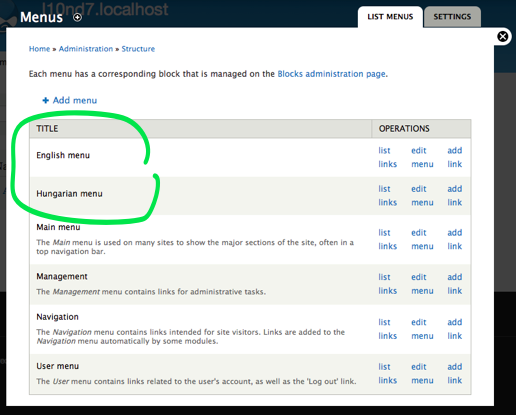
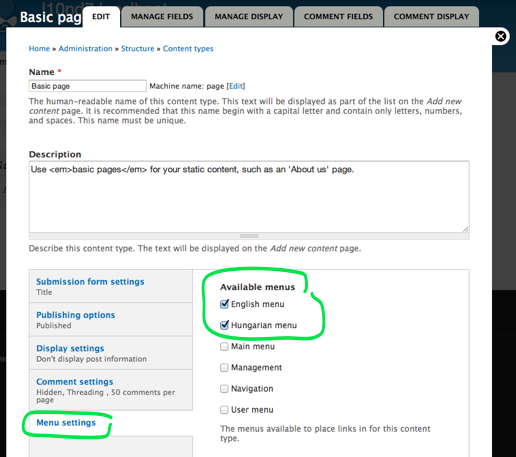
These menus will not show up in the node form though by default. To make them appear for easy association to posts, we should edit the content types involved and allow them to show these menus when nodes are created. Note that both menus will show up regardless of language of the node. Make sure to always click in language support for the node types (as explained earlier in the series) on the content type page.
Since the menus are exposed as blocks to our users, we can just enable both navigation blocks, place them under each other on the site and then reach back to what we learned about language based block visibility earlier in the series and set both blocks to only show for the respective languages.
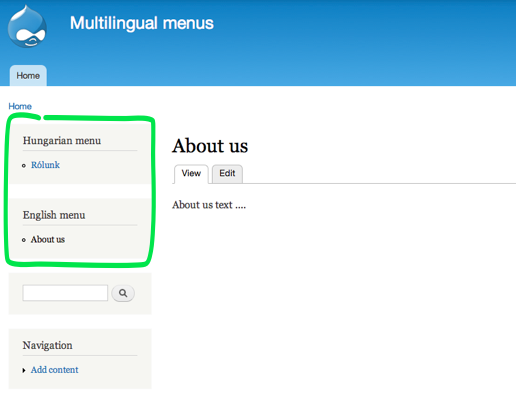
This is the simplest solution to use, and only involves already existing pieces we knew. It does require us to have separate nodes for separate languages even if they are translations of the same content, but direct menu item editing on the node page and full control on language specific menus is what we get in return.
Connect items of different menus as translations
Now, Internationalization module can do much more and add actual language awareness to menus, so let's go ahead and enable the Menu translation module (part of the i18n module suite). This will also require the translation set module, which we'll talk about briefly.
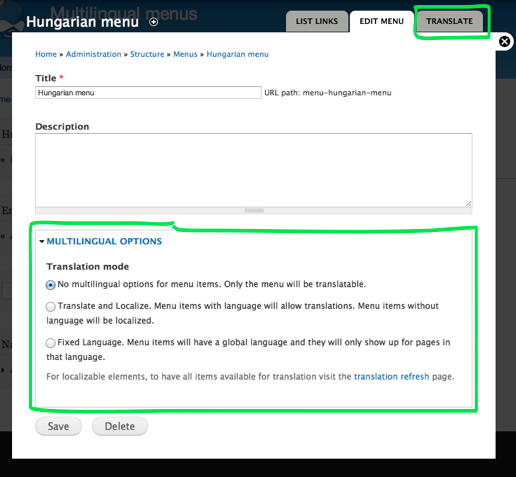
Enabling this module adds two noticeable features to the menu editing page. First of all, we can translate the menu itself. Since menus themselves have a textual name and description, those would need translation. In our case, we use the menus still for separate languages, so we are fine not going there.
Then there is a set of three multilingual options we can choose from that apply to the items themselves inside the menu. The first option says we'll not want to associate language information to items, the second says we want to decide on a per item basis and the last means we want to attach a language to this menu as a whole so it would apply language visibility to the menu items. Let's choose the second option to show how different menus can be relate items to each other.
As shown above, I've created two About us pages for Hungarian and English respectively. Block visibility is showing the right language version of the menu as expected, but the language switcher block navigation does not work to lead to the menu item in other languages. To make this work with separate menu items, we need to tell the system that the two items belong to a translation set.
Let's go edit one of the menu items, in my case the Hungarian About us page. It would show at the bottom that the language is Hungarian and that This menu item belongs to a node, so it will have the same language as the node and cannot be localized. This merely means that we cannot translate the menu title text itself. What we can do however, is to relate the item to another item. This happens in the standard translate tab on the page which lets you either create a new menu item for the translation (add translation link) or associate an existing menu item (translations fieldset).
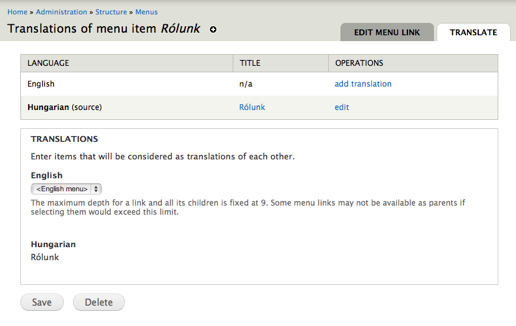
Let's pick the English About us page to relate to the Hungarian one in the fieldset! By establishing this association, we made connection between the two previously separate menu items, so the About us items in the two languages are now connected. If you hit one and click on the other language in the language switcher block, you get to the node in the other language.
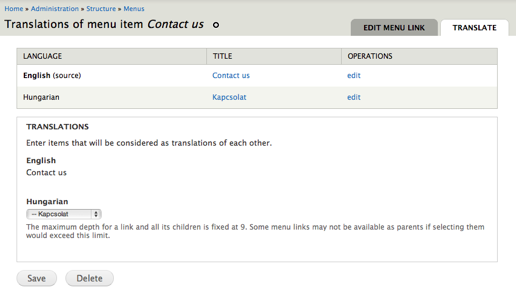
Similarly, if you have Contact module enabled, you can add an item titled Contact us to your menu pointing to the contact form. You set the language of the item proper to your menu, and you get a Translate tab for the item where you can associate the menu item as translation with another one. Here you can use the add translation menu item and create a new menu item in the other menu. The path will be pre-filled and the language will be pre-selected. Make sure to pick the right parent menu though. At the end what you get is interlinked contact form menu items in your two menus.
Keeping menu items together with localizable menu items
Wait, wait! Why did I need to create two separate menu items for the contact form with the same path? Well, I had two menu structures to maintain, so I needed a copy of the item in both menus. However, in many cases, we need an identical or nearly identical menu structure for menus in different languages, and maintaining two copies is just too tedious. Localizable menu items help in that case.
Let's create a new menu called Multilingual menu for this use case. Choose Translate and Localize for this menu as well, however, this time we'll use the whole set of benefits on offer. Let's start this time by adding the Contact us item.
Bear with me because this is not very intuitive on the UI. The Translate and Localize option explains how it works as Menu items with language will allow translations. Menu items without language will be localized. We've used the first portion of the feature set above. Now we'll make use of the second part. To use localized menu items (items shared between languages with translated title and description), we need to add the Contact us menu item as Language neutral. Yes, this is pretty counter-intuitive.
What this actually means for i18n_menu is that we want to use localization instead of associating other menu items as translations. (I think this language option could use a better name). Because configuration localization always happens in Drupal from the site's default language to other languages, make sure you create the menu item in the site default language. Good quirk to now! Again, make sure to choose Language neutral for the menu item when created.
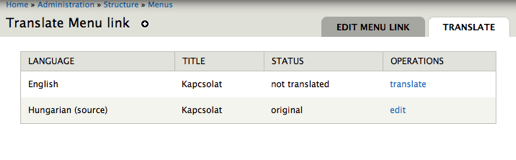
This will open up a Translate tab that at first glance will look very similar to the previous one. However, note that we don't have the option to associate existing menu items, and we have a translate action that actually lets us translate the contact menu item title and description instead of creating yet another menu item.
Finally, let's make this menu block appear on our pages, and you'll notice that the Contact us item will appear localized to the current language at hand and always point to the current language version of the page. Bingo! We just built a localized menu item where we did not need two menus or even two menu items.
Now how can we build in the two nodes for our About us page in this menu? The menu item localization does not allow to make the path different per language (it is specifically built to have same menu items appear translated), but we do have separate nodes, and therefore separate paths, so we'd need to include both menu items properly filtered for language. For this, we just replicate what we did above.
We add a menu item for node/1 (which in my case was the Hungarian page), mark it Hungarian in the menu and add a translation as a separate menu item (but this time in the same menu!), that would say About us and point to node/2 (in my case the node for the English page). Looks how we reused the same practice to have menu items in the same menu only apply to certain languages. That is why languages are specified on the menu item level. So we have a theoretically three item menu, of which only two would show at once. The Hungarian version of the About us item and the Contact us link in Hungarian or the About us page in/for English and the Contact us link properly translated to English.
So the the difference between menu item translation and menu item localization is that translation relates separate items together in a translation set and localization uses the same menu item but translates the title and description. We need to have a translation set when the paths are different, we can use localization, when they are not.
Now we have both the Multilingual menu and the two other menus referencing the About us page nodes. This makes it impossible to maintain those menu items from the nodes themselves (because the node forms only maintains one menu item per node), but the reason to have these many menus with the same pages referenced was just for the sake of demonstration. On an actual site you'd choose one or the other method for your menus based on how different you want to make your menus.
The entity translation connection
We still needed to create two separate menu items for the nodes, regardless of whether it was in the same menu or two separate menus. This stems from the basic fact that they are separate nodes with separate paths. If you are an avid reader of my previous pieces on multilingual Drupal 7, you know the solution to make these two nodes/paths one. Yes, Entity translation module will let you do that. Read more in the Node translation tutorial.
Now if you enable your content type for multilingual support with entity translation, you'll be able to create a menu item from the node page and translations for the nodes, but it will not work quite right. If you create the node in Hungarian and the translation in English, the item will only ever show up in the Hungarian rendition of the menu. This comes from the description for menu item language support that we explained above. The menu item will inherit the main node language and will only display for that language.
To solve this, we'd need to exploit the localization feature as explained for the contact page, which would require the menu item is saved Language neutral to be localized. Since the language is tied to the node, and cannot be changed on the menu item, we need to delete the menu item and create a new one, setting it to language neutral. This will suddenly let us translate the menu item to different languages, and it will show up regardless of language with the right translation. That is, until you save the node again, which would reset the menu language information and tie it to a language again.
There are clearly various points in this interaction that would need both bugfixes and usability improvements. To avoid the reset happening and the buggy display of menu items, you can work around the node path limitation by creating your node menu items manually and pointing them to node/$nid/view (instead of just node/$nid). The /view suffix still makes it point to the same page, however both Drupal and i18n looses all automation for relating it to the node, so you can freely specify the language to be neutral and translate the menu items. Also, since as said above for "language neutral" menu items, the language used for localization is the site's default language, make sure you create the menu item using the title of the node applicable to that language and translate from there to other languages.
This would not let you manage any menu items on the node forms, all menu item management would be done direct on the menu interface, but you get less menu items with more flexibility and no forced magic where you don't need it.
In summary
In summary, the different approaches explained above result in nodes, pages and menus created so (green arrows between menu items show translation set relations between items):
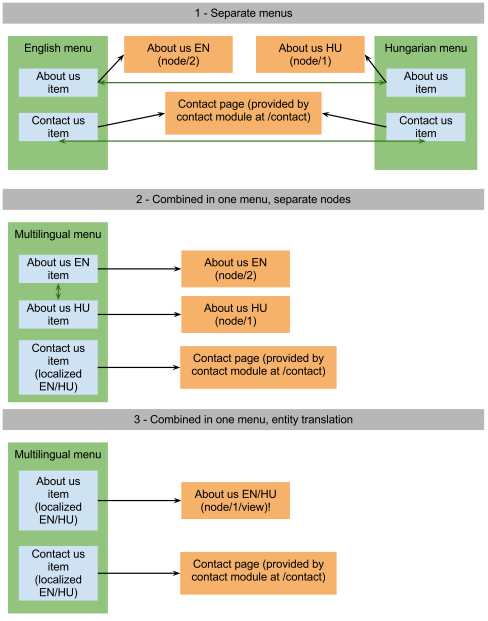
(View the full drawing at https://docs.google.com/drawings/d/166bGwkGdgS4oqXRd4hKA1gz1iQPn5VnQ90-…)
I hope this much delayed piece of tutorial helped shed some light on menu language solutions. Even though building navigation is a number one concern for site builders, this is clearly a less developed area and some non-intuitive configuration options and language specifics are to be kept in mind to navigate the waters of menu building. We went from two totally separate menus to integrating some items into one and then all items to standalone localized pieces. These techniques are to be combined in real project where sometimes you need to build completely separate menus per language and other times make menus almost identical with the least effort possible.
You can read my set of articles on Drupal 7 multilingual site construction at http://hojtsy.hu/multilingual-drupal7.
Happy site building!


Comments 18
Should menus and menu items be entities?
If menus and menu items were entities, and the content (Name, Description for menus, Title for menu items) were Fields, would that make it any simpler to settle on a translation paradigm for them? Would it eliminate the need for a separate toolset?
Yesss
Yes, see and support http://drupal.org/node/916388 please. Thanks!
It makes sense for menu items to be entities IMO
From my point of view (Drupal user, admin point of view, I am not a developer), it would make sense as we usualy need to enhance default menu entries with things like images, extra properties to make clickable or not, appear in site map or not and so on.
Actually we tend to use taxonomies when we need to build a complex menu system, as they are fieldables...
nice
wow
like to read it in such structured way
Menu links to nodes with entity translation
This info was just what I needed. I've been chasing my tail on this!!
support for views and breadcrumbs
Firstly thanks for this great series of articles providing a detailed overview of i18n suite of modules. I could get everything working more or less apart from the entity translation. Perhaps this needs to be set up from the start but when I tries to enable it it seemed to conflict. Or perhaps the way this works has changed since you wrote this article?
My question really is concerning the use of views and i18n suite. I have a site that currently uses 2 languages (phase1) that will be later expanded to support more languages. Therefore I would like to avoid using a different menu for each language.
One feature of the site will be a blog with and archive view (similar to wordpress etc), this can easily be created on views, but in order to use the i18n menu support, I have resorted to embedding a views block in a node. This works apart from the fact that blocks do not really support pagination without the use of AJAX,
My preference would be to try and use a page 'view' that has support for pagination that can be linked manually from either menu (with support for translation). I would also like to be able to reflect the correct path using the breadcrumbs trail. I am currently using custom breadcrumbs module but this does not seem to support breadcrumb trails when using page views?
In your experience, what do you think will be the best approach to get around these problems? Is this even possible? Your look at menu items seems to have overlooked how to add a page view to the menu with support for translation. I imagine this is probably quite a common problem. Also, I have not seen any mention of support for breadcrumbs using i18n including support for views. I guess this is somehow connected to the menu issue as custom breadcrumbs tends to base the breadcrumb on its menu item path right? By default the breadcrumb trail seems to display the wrong language for some reason. I have also tried to use custom breadcrumbs module to try and overide but without much success. Is there a good resource for this anywhere?
views support multilingual
having thought about this - I have worked out that one approach is to add a different page view for each language with it own path.
Simple really, so for each language you simply create a clone of the page and amend the page title, path and filters as necessary!
i18n page views
http://drupal.org/project/i18_page_views might be of help as well there.
excellent
Many Thanks.
With that module I can have a view that acts like a node and the path and breadcrumb change when using the language switcher block. Also avoids having to create clones of page views for each language.
Just what I was looking for.
Shouldn't this be part of the i18n nodule suite aswell?
consolidation
I agree it would be good to consolidate some modules there. There is already i18n_views as a separate module (not inside the i18n package) that lets you translate views, so maybe it would make sense to put it there.
user interaction
I love your series, it gives me hope for drupal8 yet leaves me languishing in the problems of 7. i won't even start about the misery of trying to get civiCRM working in multiple languages. For that you might as well build two sites...
What I am really interested in knowing, however, is best practice for end-user non logged in people that visit the multilingual installation and how they should / could navigate. Drop downs, flags, etc. Any solid solutions other than an ugly link list (even with flags it sucks)?
thanks!
site specific design
Looks like you are looking for some site specific customizations. For flags, there is the http://drupal.org/project/languageicons module. For making that a dropdown or other kind of better looking widget, it is really not the realm of language support but rather frontend development. That list could just as well be a list of your departments or something else... So I'd suggest you look around for general solutions to making lists into great dropdowns and other things on the web.
Shouldn't it be easier?
I have to say, I am a little disappointed now that I understand how things work. I am building a site with 3 languages and it seems like I need to go with option 2 and that means that I will have 3 times the number of menu items in my multilingual menu. They all have to be ordered correctly and kept in their proper parent-child relationships. Since I don't speak the other languages, this makes it difficult to manage.
Unless I'm missing something, option 3, which relies on 'node/%/view' paths, won't allow me to use path aliases. I'm also experiencing Alpha problems with Entity Translation on my in-development site, but that's another issue that I might have to solve for Taxonomy Term field translation.
Why can't the menus work like this.....
Now when the menu is displayed on the /ru site, the menu system could see that the menu item is translated and display "(RU) About Us".. which has a saved path of 'node/1' (the English version of the node) .. At this point, can't it look up the Russian version of node/1 (node/2), from the translation set, and use the path alias of that node instead of showing the path alias of node/1?
So now I would only have one menu item, with multiple translations. Each translation would fetch the right node, and if installed, display the right path alias based on the node's translation set. If the node hasn't been translated to Russian yet, the English version could be shown or maybe the menu item just disappears. If the menu item hasn't been translated to Russian yet, it could show the English version of the item or just disappear.
I'm not versed enough in Core to know if this is feasible, but it seems like it should be. And it seems like it would make things very simple.
This is just me thinking aloud :)
..jon
agreed
Absolutely agree it is confusing and complicated. Unfortunately core does not support menu item languages neither does it support editing aliases for different languages on the node edit page. So when you edit a node, it will only know of one menu item related and one path related to the node. There are many missing features there. The need for use of node/%nid/view is exactly to overcome the automation in the node/menu system that overwrites your menu items whenever you edit the node.
Yes, the i18n module could be even more invasive and override (or remove) the path alias and menu UI in node forms to avoid this problem. I think that would be a great feature request for the i18n module. I tried to document the options available now and workaround for issues that exist to come to solutions with the tools we have now.
That would be a very welcome feature
Exactly - I think. What would be really useful is to be able to set up a localised menu structure (one menu item, localised, to multiple translations) and then have a switch to detach the path alias and menu UI from the node edit forms. This way once we have our menu working and translating as intended it won't spontaneously break itself when node edit forms are saved. Have I understood this right and is there any movement on this - anywhere to voice our agreement that this would be a useful feature?
Also would just like to say thank you for this explanation of what is going on with multilingual menus - until now I have not been able to understand what I have been doing wrong, or why my working (translating) menus have been 'spontaneously' losing menu items. It is still rather annoying and the solutions are not entirely satisfactory, but at least I can now understand this behaviour.
language_fallback module & views
Hi,
Thank you for this great article. Really appreciate your posts. Have one question for you over there: what do you think about language_fallback module with respect to the translation of the strings in Views ?
Right now, i'm using i18nviews module to translate strings in views but I'm unable to display translated strings from the fallback language(s).
Did some of you stumbled over this ? Need a starting implementation for views with language_fallback.
Thanks,
C
Great set of articles!
I had to create a multilingual Drupal site before reading these articles, and it was hard to understand how things works, and if I was doing the right configs. Now I'm building another multilingual site, but things are a lot easier to understand.
Thanks!
views language menu/path
Gábor what is your proposal on https://groups.drupal.org/node/204338 ?
Is there any way to use one view (cause duplicate a view for each language, where the view is identical, is stupid - resources) and two or more menu items in different language, with different patch for each language ? Thanks.